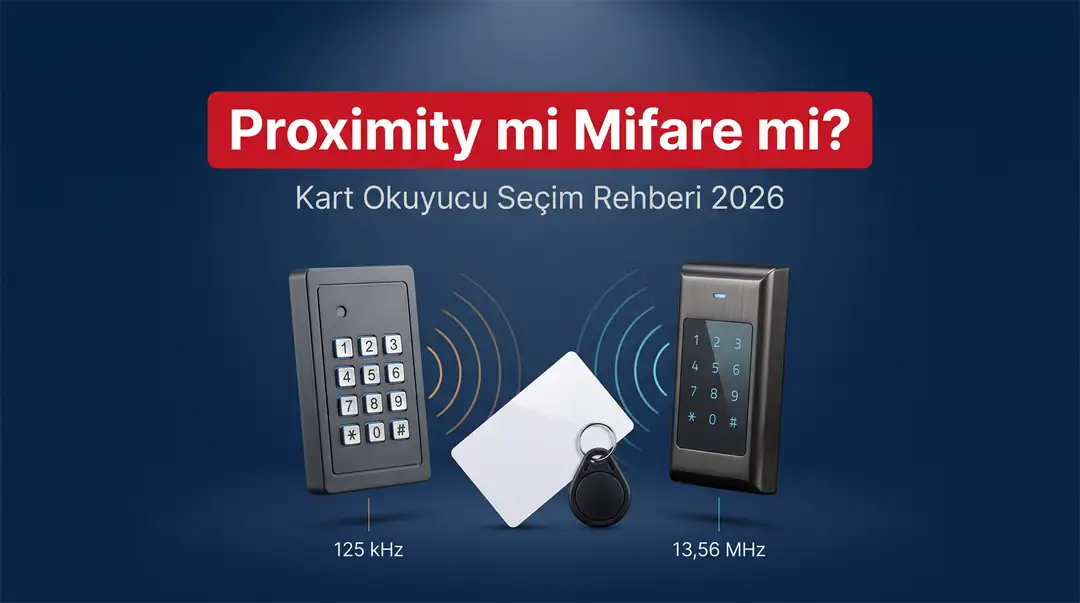
What is the real difference between 125 kHz proximity and 13.56 MHz Mifare, which is right for which building, and can the cards be copied? One guide with a decision table, a model and price list, and an installation materials list.
Contents
- How Does a Card Access System Work? Reader, Tag, Lock and Button
- What Is Proximity (125 kHz) and How Does It Work?
- What Is Mifare (13.56 MHz) and How Does It Work?
- Proximity or Mifare? Side-by-Side Comparison
- The Real Decision Point: Duplicating Cards and Key Fobs
- Which One for Which Building? Decision Table
- Will My Existing Card Work with a New Reader? Migration Scenarios
- 8 Technical Criteria for Choosing a Card Reader
- Model List: EM ↔ MF Pairs
- Card or Key Fob? Quantity Planning and Cost
- Installation Materials List: What Do You Need per Door?
- 9 Common Mistakes
- Featured Products
- Why Geçiş Kontrol AVM?
- Frequently Asked Questions
- Conclusion: The Decision Comes Down to Three Questions
Proximity and Mifare are two different radio frequencies in the world of RFID access control: proximity operates in the 125 kHz band, Mifare in the 13.56 MHz band, and the two technologies cannot read each other. In other words, if you present a Mifare card to a 125 kHz reader, the door won't open, and the reverse is also true. In most buildings, the decision comes down to three questions: do you want cards to be duplicable, how many users will the system have, and what is your budget? In short: 125 kHz proximity is sufficient for apartment buildings and small businesses that want easy, inexpensive backup cards; for facilities such as factories, offices, hotels, hospitals and schools, where card security and non-copyability take priority, 13.56 MHz Mifare is the more appropriate choice. Below, we walk you step by step through how the two technologies work, a side-by-side comparison table, the difference in copying/duplication, a decision table by building type, migration scenarios for existing systems, 8 technical selection criteria, the SARKEY SR series model list, the materials you need for installation, and common mistakes.
Proximity (125 kHz) is a simple, economical RFID technology that typically broadcasts a fixed identification number (ID); its cards and key fobs can be duplicated onto a blank tag with a suitable copier. Mifare (13.56 MHz), on the other hand, is a newer ISO 14443A technology with on-card memory and an encrypted sector structure; it is significantly harder to copy, and because data can be written to the card, it lends itself to cafeteria, library, stored-value balance and ID applications. The two frequencies are not compatible; if you want to use both in one system, you need a dual frequency device (for example, the SARKEY SR-212 TF / TF-W). Proximity readers are more economical than their Mifare equivalents in the same housing; see the product page for the current price. Shipping is free on orders of 2,000 TL and above.
How Does a Card Access System Work? Reader, Tag, Lock and Button
In its simplest form, a card access system consists of four parts: the card reader that reads the card, the tag the user carries (card or key fob), the electric/magnetic lock that keeps the door locked, and the door release button that allows exit from the inside. The reader does not open the door by itself; it triggers the relay that cuts or supplies power to the lock.
Let's follow the chain step by step. The user holds their card up to the reader. The reader's antenna wirelessly powers the chip inside the card; the chip wakes up and sends back its own ID data. The reader compares this ID against the list of authorized users in its memory. If there is a match, the dry contact relay inside the device closes, the lock circuit is controlled through this relay, and the door is released. If there is no match, the device sounds an alert and the relay never activates. In the SARKEY SR series, this entire process is completed in under 20 milliseconds — so you get a response the moment you present your card.
This four-part framework is the same at the entrance to your apartment as it is at a factory's administrative building. What changes is the capacity and durability of each part: in a 12-unit apartment building, a reader with 2,000-user capacity is more than enough, while a facility with 800 employees calls for models with 10,000-card capacity and dual-relay card readers. You can browse the full product range in the Access Control Systems category.
What Is a Tag? The Difference Between Cards, Key Fobs and Stickers
Tag is the industry's general term for the RFID identification object the user carries: a credit-card-sized RFID card, a key fob that attaches to a key ring, and an adhesive RFID sticker are all tags. All three contain a chip and antenna that do the same job; the difference lies in housing material, durability and how they are used.
On the card side, the SARKEY SR-620 (proximity, 125 kHz) and SR-621 (Mifare 1K, 13.56 MHz) are PVC ISO standard cards measuring 86 × 54 × 0.8 mm; they have a glossy surface that can be printed with an organization logo, employee name or apartment number. On the key fob side, the SR-600 / SR-600 H (proximity) and SR-601 / SR-601 İ (Mifare) models have a high-quality ABS housing; they resist crushing and breaking, offer IP68 waterproofing on select models, and read from a distance of 5–10 cm. All of these products come with a 2-year warranty.
In practice, the choice shapes up like this: RFID cards are more convenient for office and factory staff who wear a badge holder, and RFID key fobs for apartment and residential complex residents who carry keys in their pocket. In apartment buildings, key fobs have one more advantage: because they attach to the door key ring residents already carry, they are less likely to be forgotten.
Stand-Alone or Panel-Based (Wiegand) Installation?
There are two installation architectures, and the one you choose determines the type of reader you need. In a stand-alone (independent) installation, the reader reads the ID, stores the authorization list in its own memory, and drives the relay itself; no extra panel, wiring or software is needed. Most apartment entrances, single-door shops, and warehouse and office doors are handled this way.
In a panel-based installation, by contrast, the reader works only as a "reading head" and sends the ID it reads to a central access control panel using the Wiegand protocol. The authorization decision is made at the panel, and the panel opens the door. Wiegand has been the common language of the access control industry for decades and typically runs in 26-bit or 34-bit format. Nearly the entire SARKEY SR series features "Standalone, Wiegand Output"; in other words, you can use the same device on its own today and integrate it into a central system tomorrow by connecting it to a panel. The SR-270 EM-W takes this a step further and supports Wiegand WG26 as both output and input.
This distinction directly affects cost. In an installation that doesn't require a panel, the cost per door is limited to the reader + lock + button. In scenarios involving central reporting, shift-based permissions and multiple doors, however, investing in a panel is unavoidable. If you're not sure, the quickest way to work out the right architecture together is to reach us through the "Ask a Question" section on product pages or via our WhatsApp line (0539 821 66 12).
What Is Proximity (125 kHz) and How Does It Work?
Proximity is an RFID technology that operates in the 125 kHz low-frequency band, where the chip inside the card typically broadcasts an unchangeable, fixed identification number (ID). In the industry, these cards are also often called EM cards; common chip families are EM4100 and TK4100. The card has no battery; it draws its power from the magnetic field generated by the reader.
The operating principle is as simple as it gets, and that is also where its strength comes from. The reader continuously emits a 125 kHz field. When the card enters this field, a voltage is induced in its antenna coil, the chip wakes up and repeatedly broadcasts the ID number written into its memory at the factory. The reader receives this number, compares it against the authorized list and makes its decision. There is no "negotiation" and no password check between card and reader — the system assumes that whoever knows the number is authorized.
This simplicity has three concrete consequences. The first is cost: on both the reader and the tag side, proximity is significantly cheaper than Mifare. Comparing the SR-204 EM and SR-204 MF, which share the same housing, the proximity version delivers noticeable savings per door; see the product page for the current price. The second is easy backup: thanks to the fixed ID, cards can be duplicated onto a blank tag with a suitable copier. The third is the other side of the coin — copyability is a security weakness; anyone who can read the card's number can produce a copy carrying the same number.
One detail in SARKEY's proximity tags changes this picture: the SR-600, SR-600 H key fobs and SR-620 cards are positioned by the manufacturer as "non-copyable"; they contain a fixed ID, and this ID cannot be rewritten. To make duplicates, you need to buy separate writable (blank) tags — the SR-602 / SR-602 H key fobs and SR-622 cards are made exactly for this. So the statement "proximity can be copied" does not mean "any proximity card you have can be duplicated in three minutes"; duplication requires the right blank tag and an RFID copier.
Proximity's Strengths
- Low cost: Reader and tag costs are significantly lower than with Mifare, and multi-pack tags bring the unit cost down even further.
- Wide product range: On the proximity side, the SARKEY range includes indoor, outdoor IP68, metal anti-vandal, LCD display, keypad, biometric, OEM module and video intercom options.
- Easy backup tags: A lost key fob can be replaced within minutes with the right blank tag and a copier.
- Tolerant reading: The low frequency works reliably through thin non-metallic surfaces and in humid environments; SARKEY tags are specified with a 5–10 cm reading distance.
- Widespread use: Most existing apartment and small business installations in Türkiye are 125 kHz, so the cards don't need to be replaced when you install a new reader.
Proximity's Limitations
- No data can be written to the card: It carries no information beyond the fixed ID, so it isn't suitable for applications such as cafeteria balances or library loan records.
- No encrypted authentication: There is no mutual authentication between the reader and the card.
- Writable tags can be duplicated: This is an advantage if you want backups, and a risk if you want to prevent unauthorized duplication.
- Limited future flexibility: As the system grows and takes on multiple applications, you may need to switch to 13.56 MHz.
What Is Mifare (13.56 MHz) and How Does It Work?
Mifare is an RFID technology that operates in the 13.56 MHz high-frequency band under the ISO 14443A standard, with writable memory and a key-protected sector structure inside the card. Its most common version, Mifare 1K, carries, as the name suggests, 1 kilobyte of memory, and this memory is divided into sectors.
This is exactly where the difference begins: a proximity card simply says "I am this number," while a Mifare card carries out mutual authentication with the reader. Access to each sector of the card's memory requires knowing that sector's keys. If the correct key isn't presented, the reader can neither read nor write the data in that area. This structure opens two big doors. The first is security: capturing the ID over the air and making an exact copy is significantly harder than with proximity. The second is multi-application use: one sector of the same card can hold door access, another the cafeteria balance, and yet another library loans.
You can see this philosophy at work in SARKEY's Mifare tags. The product description of the SR-621 ISO Mifare 1K card states it plainly: no serial number is printed on the card. In other words, you don't get the proximity-card convenience of "manually entering the number on the front into the system"; the card is enrolled on the reader using the master card or the master PIN. Likewise, the SR-601 and SR-601 İ Mifare key fobs have no ID number on the front. While this may look like a hassle at first glance, it is actually part of the security design: the card's ID is not information that anyone who sees the card can read.
Mifare's Strengths
- Significantly higher security: The key-protected sector structure renders simple signal copying ineffective.
- Data can be written to the card: Information such as balance, authorization level and employee ID can be carried on the card itself.
- One card, many applications: Access + cafeteria + parking + library scenarios can be combined on the same card.
- No visible ID on the card: If a card is lost, no information about the system leaks from a number printed on it.
- Professional look: With a logo and employee details printed on the PVC ISO card, it can also serve as an ID card.
Mifare's Limitations
- Higher cost: A Mifare reader in the same housing (for example, the SR-204 MF) is more expensive than its proximity equivalent (SR-204 EM); see the product page for the current price.
- More involved backup process: Duplication requires a different class of copier; 125 kHz devices cannot copy Mifare.
- Relatively narrower product selection: In the SARKEY range, some of the LCD display, video intercom and OEM models are available only in a 125 kHz version.
- No manual enrollment: Since there is no number on the card, enrollment is done with the master card/PIN or a desktop USB reader.
Proximity or Mifare? Side-by-Side Comparison
The one-sentence answer: if cost and easy backup cards are your priority, choose proximity; if card security and multi-application use are your priority, choose Mifare. The table below lays out, side by side, the ten factors to weigh when you decide.
| Criterion | Proximity — EM (125 kHz) | Mifare — MF (13.56 MHz) |
|---|---|---|
| Frequency | 125 kHz (low frequency) | 13.56 MHz (high frequency) |
| Standard / chip | EM4100, TK4100 family | ISO 14443A, Mifare 1K |
| On-card memory | None — fixed ID only | Yes — 1 KB, divided into sectors |
| Security | Basic; no encrypted authentication | High; sector key authentication |
| ID on the card | Printed (on the front of SR-600 / SR-620) | Not printed (SR-601 / SR-621) |
| Enrollment in the system | By presenting the card or entering the number printed on it | By presenting the card via the master card / master PIN |
| Backup tag | SR-602 / SR-622 blank tag + SR-630 device | SR-603 / SR-623 blank tag + SR-631/633 class device |
| Multi-application use | Not suitable | Suitable (cafeteria, library, balance) |
| Price level | More economical (entry model SR-204 EM) | Higher (entry model SR-204 MF) |
| Model variety | Very wide (including LCD, video intercom, OEM, dual relay) | Wide but narrower (basic, outdoor, biometric) |
| Typical use | Apartment building, residential complex, shop, warehouse, small office | Factory, office tower, hotel, hospital, school, shopping mall |
Proximity and Mifare cards are not interchangeable. A 125 kHz reader doesn't see a 13.56 MHz card, and a 13.56 MHz reader doesn't read a 125 kHz card — the card isn't faulty, the frequency is different. The only way to use both technologies together on the same door is a dual frequency device: the SARKEY SR-212 TF (indoor) and SR-212 TF-W (outdoor IP68) read both 125 kHz and 13.56 MHz tags, and also offer capacity for 300 fingerprints and 10,000 cards/codes. See the product page for the current price.
The Real Decision Point: Duplicating Cards and Key Fobs
In Türkiye, the most practical question that settles the choice between proximity and Mifare isn't security theory but something far more concrete: "When a resident loses their card, how will I issue a new one?" The answer works completely differently on the two frequencies, and this difference should largely drive your decision.
The SARKEY product range is unusually clear on this point; the product descriptions spell out, one by one, which tags can be duplicated and which cannot. The logic works like this: tags containing a fixed ID cannot be copied (SR-600, SR-600 H, SR-601, SR-601 İ, SR-620, SR-621); for duplication, you buy separate blank, writable tags (SR-602, SR-602 H, SR-603, SR-604 A/B/K, SR-622, SR-623). In other words, a copy of your existing card is produced by writing it onto a blank tag.
| Tag | Frequency | Type | Can it be duplicated? | How? |
|---|---|---|---|---|
| SR-600 / SR-600 H | 125 kHz | Key fob, fixed ID | Cannot itself be duplicated | Used as the source tag; the copy is written to an SR-602 |
| SR-602 / SR-602 H | 125 kHz | Key fob, blank/writable | Yes | Written with the SR-630 (or SR-631/633) copier |
| SR-604 A / B / K | 125 kHz | Key fob, blank/writable | Yes | Blank tag in various shapes and colors |
| SR-620 | 125 kHz | ISO card, fixed ID | Cannot itself be duplicated | The copy is written to an SR-622 blank card |
| SR-622 | 125 kHz | T5557 writable card | Yes | Written with the SR-630 / SR-631 / SR-633 |
| SR-601 / SR-601 İ | 13.56 MHz | Mifare key fob, fixed ID | Cannot itself be duplicated | The copy is written to an SR-603 blank Mifare tag |
| SR-603 | 13.56 MHz | Mifare key fob, blank/writable | Yes — but the SR-630 isn't enough | Only with an SR-631 / SR-633 class device |
| SR-621 | 13.56 MHz | Mifare 1K ISO card | Cannot be copied onto itself | The copy is written to an SR-623 blank Mifare card |
| SR-623 | 13.56 MHz | T5557 writable Mifare card | Yes | With an SR-631 / SR-633 class device |
SR-630 Copier: What It Can and Can't Do
The SARKEY SR-630 is a desktop copier that duplicates only 125 kHz proximity tags. Using it is as simple as two buttons: you hold the card or key fob to be copied up to the device and press Read, then hold the blank tag up to it and press Write. After a single read, the device can perform multiple writes in a row — so you don't need to read five times to produce five backup key fobs for five apartments.
Technically, the SR-630 is a blue-housed unit measuring 115 × 70 × 30 mm, powered by DC12V, with a 5–10 cm reading range, a Wiegand 26/34-bit interface and an operating range of −25 °C to +75 °C. Its scope is defined precisely on the product page: SR-620 cards and SR-600, SR-600 H tags are copied onto SR-622 cards and SR-602, SR-602 H tags.
Here is the critical limitation: the SR-630 cannot copy Mifare (13.56 MHz) tags. For duplication on the Mifare side, the product descriptions point to SR-631 or SR-633 class devices. So you should factor in from the start the possibility that "if I choose Mifare, I can't produce backup cards myself." For apartment building and residential complex management, this alone can be decisive — being able to produce a new card in the management office within minutes when a resident loses theirs is a major convenience.
Master Card and Master PIN: The Other Way to Copy
A copier writes an exact copy of the existing ID to the new tag. The second method is completely different: enrolling the new tag in the reader as a new user. This requires the reader's master card or master PIN. On SARKEY readers, enrollment is done by putting the device into programming mode with the master PIN and presenting the new tag.
It's important to understand the difference between the two methods. A backup produced with a copier is, from the system's point of view, a twin of the original card; if you delete the original after a loss, the copy stops working too. A tag enrolled via the master, on the other hand, is a separate record in the system and can be deleted individually. In busy buildings, the second method is much easier to manage. That's why you should always know your master PIN and keep a record of it; for the products' operating steps, see the user manuals and datasheet archive.
In corporate installations where hundreds of cards need to be enrolled, a third option comes into play: the desktop USB reader. The SR-220 EM (125 kHz) and SR-220 MF (13.56 MHz) plug into a computer, work plug-and-play without a driver, and type the number of the card you present straight onto the screen. Reading cards one by one into a list instead of manually entering 300 employees' card numbers saves hours. You can find these models in the desktop card readers category.
Which One for Which Building? Decision Table
The right frequency depends not on the type of building but on the building's needs: the number of users, card turnover, security expectations, and whether the card will be used for anything else. The table below gives direct recommendations for the ten scenarios most often encountered in Türkiye.
| Scenario | Recommended frequency | Example model | Why? |
|---|---|---|---|
| Apartment building with 8–30 units | Proximity 125 kHz | SR-204 EM or SR-205 EM | Economical; backup key fobs are produced in the management office with the SR-630 |
| Garden gate / exterior door | Proximity 125 kHz | SR-206 EM-W or SR-209 EM-W | IP68 waterproof + anti-vandal housing is a must |
| Large residential complex (200+ units) | Mifare 13.56 MHz | SR-209 MF-W (10,000 cards) | High card turnover; the risk of unauthorized duplication should be reduced |
| Shop, warehouse, workshop | Proximity 125 kHz | SR-204 EM Max or SR-215 EM | Low cost; 10,000-card capacity on the SR-215 EM |
| Office / office tower floor | Mifare 13.56 MHz | SR-208 MF or SR-200 MF | Corporate ID card + higher card security |
| Factory main entrance / turnstile | Mifare 13.56 MHz | SR-211 MF-W or SR-212 MF-W | Fingerprint + card + PIN; outdoor IP68 metal housing |
| Hotel / dormitory | Mifare 13.56 MHz | SR-205 MF or SR-208 MF | Frequent card turnover; being able to write data to the card is an advantage |
| School, library, cafeteria | Mifare 13.56 MHz | SR-211 MF + SR-621 cards | One card, many applications (access + balance + loans) |
| Elevator floor/car control | Both (OEM module) | SR-230 EM or SR-230 MF | 51 × 37 mm caseless module; hides inside a nameplate/button |
| Two different card types side by side | Dual frequency | SR-212 TF / SR-212 TF-W | 125 kHz + 13.56 MHz in the same device; ideal for a transition period |
Detailed Recommendation for Apartment Buildings
In a typical apartment building installation in Türkiye, the decision almost always comes out in favor of proximity; the reason isn't that security doesn't matter, but ease of operation. In a forty-unit building, a few key fobs get lost every year, a few apartments change hands, and new tenants move in. Management needs to be able to handle this cycle without depending on outside help. On the 125 kHz side, once you put an SR-630 and a box of SR-602 blank key fobs in the management office, producing backups becomes a matter of minutes.
The second reason is budget. In an apartment building installation, the cost isn't just the reader: there is the lock, the button, the power adapter, the wiring, and as many tags as there are apartments. For forty apartments, assuming an average of two tags each, you need eighty tags; on the proximity side, this line item is noticeably lighter. What's more, SARKEY's multi-pack options (50, 100, 250, 500, 750, 1,000 pcs) make it easy to buy according to the size of the building.
When should you switch to Mifare? In three cases: (1) if the building exceeds 200 units, (2) if management wants to definitively prevent unauthorized card duplication, (3) if the card will later also be used for other applications such as parking, elevators or social facilities. If at least two of these three conditions apply, the Mifare investment pays for itself.
Detailed Recommendation for Businesses
On the corporate side, the equation is reversed: a card that can be duplicated is not an advantage but a risk. If an employee card can easily be cloned, every process — time records, restricted area permissions, visitor control — is open to doubt. That's why Mifare should be the default choice in facilities such as factories, office towers, hospitals and laboratories.
The second critical factor is capacity. In the SARKEY range, capacity falls into three tiers: 1,000 users (SR-204 series), 2,000 users (SR-200, SR-205, SR-208, SR-210, SR-219, SR-221, SR-270) and 10,000 users (SR-207, SR-209, SR-211, SR-212, SR-213, SR-214, SR-215, SR-218). Choosing a capacity at least twice your headcount is good practice; subcontractors, temporary staff and visitor cards quickly push the numbers up.
The third is the authentication layer. In critical areas, a card alone isn't enough. SARKEY biometric models support card, PIN and fingerprint together: the SR-211 and SR-212 series offer 300-fingerprint capacity alongside 10,000 cards/codes. Making the "card + fingerprint" combination mandatory at points such as IT rooms, vault rooms and sample laboratories completely eliminates the duplication risk. You can browse these models in the card readers with keypad and fingerprint category.
Will My Existing Card Work with a New Reader? Migration Scenarios
The short answer: only if the frequencies match. If your tag is 125 kHz, the new reader must also be 125 kHz (EM); if it's 13.56 MHz, you should choose the Mifare (MF) version. If the frequencies don't match, the card won't be read and the device won't respond at all — this isn't a fault, it's a difference in technology.
So how do you tell which one you have? There are three practical clues. The first is the text on it: if the card or key fob says "125 kHz", "EM", "EM4100" or "TK4100", it's proximity; if it says "13.56 MHz", "MF", "Mifare" or "ISO 14443A", it's Mifare. The second is a visible number: SARKEY proximity tags (SR-600, SR-600 H, SR-620) have an ID number printed on the front, while Mifare tags (SR-601, SR-601 İ, SR-621) have no such number. The third is the model of your existing reader: if the model code contains "EM", it's 125 kHz; if it contains "MF", it's 13.56 MHz. If you can't be sure, you can send a photo of your tag via WhatsApp (0539 821 66 12) and get confirmation.
Scenario 1 — Only the Reader Changes, the Cards Stay
This is the most common situation: the reader is old, its keys are worn, or it has taken on water outdoors, but you don't want to replace hundreds of tags in the building. In this scenario, all you need to do is choose a reader on the same frequency as your existing tags. If you use 125 kHz, models such as the SR-204 EM, SR-205 EM, SR-208 EM and SR-215 EM will do the job; if you use 13.56 MHz, equivalents such as the SR-204 MF, SR-205 MF and SR-208 MF will. The tags stay as they are; they are simply enrolled in the new device.
One thing to watch: a new reader won't work with tags until they are stored in its memory. In other words, when you install the device, the old cards don't automatically become valid; you need to re-enroll them all with the master PIN. For 40 apartments, this is a half-hour job; for 400 employees, it's far smarter to prepare the list in bulk with a desktop USB reader.
Scenario 2 — Switching from Proximity to Mifare
If you're moving from 125 kHz to 13.56 MHz to upgrade security, both the readers and the tags have to change. This is the highest-cost scenario, and it can be managed in two different ways.
Cutover method: On a set date, all readers and all cards are replaced at the same time. It's fast, but it requires an intensive operation and full card distribution on that day, which isn't easy in a 500-person facility.
Phased migration: Dual frequency devices are installed on the doors, and the two card types work together for a while. Cards are replaced gradually, and once everyone has switched to their new card, the old tags are deleted from the system. SARKEY's SR-212 TF (indoor) and SR-212 TF-W (outdoor IP68) are made exactly for this: they read 125 kHz and 13.56 MHz tags together, offer capacity for 10,000 cards/codes and 300 fingerprints, and feature a 139 × 70 × 22 mm metal anti-vandal housing and a backlit touch keypad. Card reading distance is 2–5 cm, and the door open time is adjustable between 0–99 seconds.
Scenario 3 — Adding a Second Door
When adding a new door to your existing system, the rule is simple: stay on the same frequency. That way, your tags work on both doors and you don't need to hand out a second card to residents/staff. If the new door is indoors, you'll want a slim model such as the SR-205 EM/MF; if it's outdoors, an IP68-protected model such as the SR-206 EM-W or SR-209 EM-W/MF-W.
If you want to manage two doors from a single point (for example, a garden gate and the building entrance), the SR-270 EM-W is a practical solution: with its dual-relay design, it controls two separate locks, is IP68-protected, and features a metal anti-vandal housing and a digital backlit keypad; it supports Wiegand WG26 as both input and output. Compared with the cost of two separate readers and two separate wiring runs, it often comes out ahead; see the product page for the current price.
8 Technical Criteria for Choosing a Card Reader
Once you have decided on the frequency, it's time to pick the model, and eight technical factors settle it: card capacity, indoor/outdoor use, housing type, keypad, number of relays, Wiegand output, supply voltage and door open time. Get these eight right, and your chance of buying the wrong product drops to nearly zero.
1. Card capacity: How many users will there be?
Capacity is the number of authorized tags the device can store in its memory. There are three tiers in the SARKEY range: 1,000 (SR-204 EM/MF, SR-204 EM Max), 2,000 (SR-200, SR-205, SR-208, SR-210, SR-219, SR-221, SR-270) and 10,000 (SR-207, SR-209, SR-211, SR-212, SR-213, SR-214, SR-215, SR-218). Base the calculation not on the number of users but on the number of tags: if you gave two key fobs to each of 40 apartments, you need 80 records; if three, 120. That's why choosing a capacity at least twice your current requirement is a good habit.
A notable detail: the SR-215 EM offers 10,000-card capacity in the entry-level price range. If you don't need a PIN/keypad (card-only access), it is one of the most efficient models in the range in terms of price-to-capacity. The door open time is adjustable from 0–99 seconds, and the power supply is DC 12–24 V.
2. Indoor or outdoor? What IP68 means
The door's location is the second most decisive factor in your choice. A device used in an enclosed corridor, an apartment entrance hall or inside an office belongs to the indoor class. Devices that will be exposed outdoors to rain, snow, humidity and temperature swings — even under an eave — require the IP68 waterproof and anti-vandal (impact-resistant) class. At SARKEY, these models carry the "-W" suffix at the end of the code: SR-200 EM-W, SR-206 EM-W, SR-207 EM-W, SR-209 EM-W/MF-W, SR-210 EM-W, SR-211 EM-W/MF-W, SR-212 EM-W/MF-W/TF-W, SR-213 LCD EM-W, SR-214 LCD EM-W, SR-219 EM-W/MF-W, SR-270 EM-W.
For budget-constrained installations that have no choice but to use an indoor device outdoors, there is one more interim solution: the SR-250 card reader rain cover. It has an ABS housing, with outer dimensions of 15 × 10.4 × 9 cm and inner dimensions of 13.5 × 8.9 × 8.4 cm; it forms a barrier between the device and water and also absorbs potential impacts. Still, the permanent and proper solution is to install an IP68 model outdoors from the start. You can find accessories in the card reader accessories category.
3. Housing type: Plastic or metal anti-vandal?
The housing material determines both durability and deterrence. Plastic housing models (SR-204, SR-205, SR-208, SR-215, SR-221, SR-219) are lightweight, economical and sufficient for indoor spaces. Metal anti-vandal housing models (SR-200, SR-209, SR-210, SR-211, SR-212, SR-213, SR-214, SR-218, SR-261, SR-270) are significantly more resistant to impact and tampering.
The weight difference makes this resistance tangible: the SR-204 EM in a plastic housing weighs 110 grams, the SR-200 EM in a metal housing 360 grams, the SR-212 series 480 grams, the SR-211 series 510 grams, the SR-214 LCD 520 grams, and the SR-270 EM-W 700 grams. At street-facing points, spots left empty at night, or locations with heavy foot traffic, opt for a metal housing; the cost of a device being broken and replaced is higher than the price difference.
4. Keypad and operating mode
Keypad models offer three operating modes: PIN, card and card + PIN. The third takes security up a level — even if a card is stolen, the door won't open without the PIN. Making this mode mandatory for critical areas is the cheapest safeguard against the risk of card copying.
Card-only models (SR-207 EM-W, SR-209 EM-W/MF-W, SR-215 EM) are more economical and require no keypad maintenance; at high-traffic doors, pressing keys is a waste of time anyway. If you want a keypad, also check the type of backlighting: the SR-210 EM-W, SR-212 series, SR-219 EM-W and SR-221 EM use a digital backlit touch keypad, which makes a noticeable difference at dark entrances. You can see these models in the keypad card readers category.
5. Relay: Single or dual?
All SARKEY readers provide output through a dry contact relay; that is, the relay doesn't carry the lock circuit's voltage, it simply closes the contact like a switch. This lets the reader work with locks of different voltages and protects the device.
Standard models have a single relay and drive a single door. The SR-270 EM-W, however, manages two separate doors from one device with its dual-relay design. In two-door scenarios such as garden gate + building entrance, main door + back door, or turnstile + door, a single device is enough instead of a second reader and a second cable run.
6. Wiegand output: Not for today, but for tomorrow
Wiegand is the industry-standard interface that lets a reader pass the ID it reads to a panel; its common formats are WG26 and WG34. In the SARKEY SR series, almost all models are specified as "Standalone, Wiegand Output". The SR-208 EM specifically lists WG26/WG34 output, while the SR-270 EM-W supports WG26 as both input and output.
In practical terms: even if you set up a single-door stand-alone installation today, you won't need to remove your readers if you later want to move to a central access control panel or a time and attendance (PDKS) system; the same devices keep working as the panel's reading heads. It's a quiet but important feature that protects your investment.
7. Supply voltage and power supply
The standard supply for the SR series is DC 12 V ±10% / 3 A. Some models are more flexible: the SR-204 EM Max and SR-221 EM run on 12/24 V AC/DC, the SR-215 EM accepts DC 12–24 V, and the SR-213 LCD series is specified with a 12–24 V DC supply voltage. Desktop USB readers (SR-220 EM/MF), on the other hand, draw power from USB and run on DC 5 V.
If your existing electrical panel provides 24 V AC/DC and your device requires 12 V DC, you need to add a converter in between: the SR-251 is made exactly for this — it converts a 24 V AC/DC input to a 12 V DC output. When choosing a power supply, also factor in the lock's current draw; magnetic locks draw power continuously and can require far more current than the reader alone.
8. Door open time and reading distance
Door open time determines how long the door stays released after the relay closes. On SARKEY models, this value is typically adjustable between 0–99 seconds. For apartment entrances, 3–5 seconds is usually enough; for warehouse doors where goods are carried through, 10–15 seconds is more comfortable. Leaving the time unnecessarily long means the door stays open for a long time, which weakens security.
Reading distance, meanwhile, varies from device to device. On wall-mounted readers, the typical value ranges from 2–5 cm (SR-211, SR-212, SR-213, SR-214 series) to 5–8 cm (SR-220 desktop, SR-270 EM-W). On the tag side, SARKEY key fobs and cards are specified with a 5–10 cm operating distance. OEM modules (SR-230 EM/MF) read in the 0–100 mm range and, at 51 × 37 × 1 mm, can be hidden inside a nameplate, door intercom or elevator car button.
Model List: EM ↔ MF Pairs
The most practical thing about the SARKEY range is that most models come in both an EM (125 kHz) and an MF (13.56 MHz) version. In other words, the body, capacity and housing stay the same, and you simply choose the frequency. The table below lays out these pairs and their key features side by side; see the product page for the current price.
| Model pair | Capacity | Environment / housing | EM (125 kHz) | MF (13.56 MHz) |
|---|---|---|---|---|
| SR-204 | 1.000 | Indoor / plastic, keypad | SR-204 EM | SR-204 MF |
| SR-205 | 2.000 | Indoor / plastic, slim (114×45×18 mm) | SR-205 EM | SR-205 MF |
| SR-208 | 2.000 | Indoor / plastic, WG26–WG34 | SR-208 EM | SR-208 MF |
| SR-200 | 2.000 | Indoor / metal anti-vandal | SR-200 EM | SR-200 MF |
| SR-200 -W | 2.000 | Outdoor IP68 / metal | SR-200 EM-W | SR-200 MF-W |
| SR-209 -W | 10.000 | Outdoor IP68 / metal, card only | SR-209 EM-W | SR-209 MF-W |
| SR-211 | 10,000 + 300 fingerprints | Indoor / metal | SR-211 EM | SR-211 MF |
| SR-211 -W | 10,000 + 300 fingerprints | Outdoor IP68 / metal | SR-211 EM-W | SR-211 MF-W |
| SR-212 | 10,000 + 300 fingerprints | Indoor / metal, touch keypad | SR-212 EM | SR-212 MF |
| SR-212 -W | 10,000 + 300 fingerprints | Outdoor IP68 / metal | SR-212 EM-W | SR-212 MF-W |
| SR-219 -W (TUYA app) | 2.000 | Outdoor IP68 / plastic, mobile app | SR-219 EM-W | SR-219 MF-W |
| SR-220 (desktop USB) | — | Desktop, plug-and-play, DC5V | SR-220 EM | SR-220 MF |
| SR-230 (OEM module) | — | 51×37×1 mm caseless module | SR-230 EM | SR-230 MF |
| SR-212 TF / TF-W | 10,000 + 300 fingerprints | Dual frequency — indoor / outdoor IP68 | Two frequencies in one device: SR-212 TF (indoor) · SR-212 TF-W (outdoor IP68) | |
Because prices change with exchange rates and promotions, this guide doesn't list fixed prices; see the relevant product page for the current price. As a general rule, the MF version in the same housing is more expensive than the EM version. When you pay by bank transfer (Havale/EFT), the price is lower than a single-payment credit card purchase.
Special Models Available Only in 125 kHz
Some feature-rich models are available in the range only in a proximity version, which may affect your frequency decision. This group includes the LCD display SR-213 (indoor / outdoor) and SR-214 (indoor / outdoor), the video intercom SR-261 EM-W (1,000 cards + 200 fingerprints + TUYA app), the dual-relay SR-270 EM-W and the metal-housed Wi-Fi/TUYA SR-218 EM-W (10,000 cards).
So if you want a door that is "LCD display and Mifare" or "video intercom and Mifare", there is no direct equivalent in the range. In such cases, you either stay on 125 kHz or build a setup around the dual frequency SR-212 TF-W, which can also read your Mifare tags. You can compare the entire reader family and current prices in the card readers category.
In the same housing, the Mifare version is more expensive than the proximity version. But the real difference isn't in the reader; it adds up across the hundreds of tags in the building — so base your frequency decision on your card count. Source: SARKEY SR series product pages, geciskontrolavm.com
Card or Key Fob? Quantity Planning and Cost
The short answer: a card if information will be printed on it, a key fob if it will be carried in a pocket. Technically, both do the same job; the difference lies in usage habits, durability and printability.
Cards have a PVC body in the 86 × 54 × 0.8 mm ISO size; their surface is glossy and can be printed on. If you want to produce corporate ID cards, student cards or apartment cards printed with the unit number, this is the only option. On the SARKEY side, the SR-620 (proximity 125 kHz) and SR-621 (Mifare 1K 13.56 MHz) are designed for this; both come with a 2-year warranty.
Key fobs, on the other hand, have a high-quality ABS housing; they are more resistant to crushing and breaking than cards and offer IP68 waterproofing on select models — an important advantage against mishaps in pockets, in the washing machine or in the rain. The SR-600 / SR-600 H (proximity) and SR-601 / SR-601 İ (Mifare) come in white, black, gray, blue, red, yellow, purple and orange, which makes color-coding by building block or authorization group possible.
| Comparison | RFID Card (SR-620 / SR-621) | RFID Key Fob (SR-600 / SR-601) |
|---|---|---|
| Material / size | PVC, 86 × 54 × 0.8 mm | ABS, key fob form |
| Printing | Possible (logo, name, apartment no.) | Not suitable |
| Durability | Sensitive to bending | Resistant to crushing/breaking, IP68 on select models |
| Color options | White base (colored through printing) | 8 colors (suitable for group coding) |
| Carrying | Badge holder, lanyard, wallet | Key ring, pocket |
| Warranty | 2 years | 2 years |
| Typical use | Office, factory, school, hotel, hospital | Apartment building, residential complex, shop, warehouse |
How Many Should You Buy?
Calculating the number of tags involves three components: number of users × tags per person + spare stock + management/service cards. In apartment buildings, 2 tags per apartment is a common standard, rising to 3 for larger families. In businesses, 1 card per person is enough, but keeping 10% spare stock lets you replace a lost card the same day. Also plan separate cards for the manager, technical service and cleaning staff.
Example calculation: for a 40-unit apartment building, 40 × 2 = 80 tags, +10% spares = 8, + 4 for management/caretaker/service → a total of about 92 pcs. So the 100-pack is the right purchase. For a factory with 250 employees, 250 + 25 spares + 15 visitors = about 290 pcs → instead of moving up to the 500-pack, a 250 + 50 combination may be more economical.
At Geçiş Kontrol AVM, cards and key fobs are sold in multi-packs: 50, 100, 250, 500, 750, 1,000, 5,000, 10,000 pcs options are available, and the standard packaging is 10 pcs/bar, 200 pcs/carton and 5,000 pcs/case. The larger the pack, the lower the unit cost; current prices are displayed according to the quantity you select on the product page. You can find the products in the proximity key fobs, Mifare key fobs, proximity cards and Mifare cards categories.
Installation Materials List: What Do You Need per Door?
Converting a single door to card access takes five items: a card reader, a lock, a door release button, a power supply and tags. A common mistake is ordering only the reader and forgetting the lock and button — a reader on its own doesn't open any door.
| Item | What does it do? | Example product |
|---|---|---|
| 1. Card reader | Reads the ID, checks authorization, drives the relay | SR-204 EM (indoor) · SR-206 EM-W (outdoor IP68) |
| 2. Lock | Physically keeps the door locked | SR-280 magnetic lock (280 kg) · SR-550 NC electric strike |
| 3. Door release button | Allows exit from the inside without presenting a card | SR-720 metal button · SR-700 no-touch (flush-mount) |
| 4. Power supply / converter | Powers the reader and lock (typically DC 12 V) | SR-251 24V→12V converter |
| 5. Tags | Cards/key fobs carried by users | SR-600 H key fob · SR-620 card (multi-pack) |
| Optional | Backup production, outdoor protection | SR-630 copier · SR-250 rain cover |
See the product pages for the current prices of the products in the table. When you plan all items in a single order, you benefit from free shipping, which applies to orders of 2,000 TL and above.
Choosing a Lock: Magnetic or Electric Strike?
There are two main lock families. A magnetic lock (maglock) works on the electromagnet principle: when powered, it pulls and holds the door; when power is cut, it releases it. This behavior is called fail-safe, and it is the desired behavior on evacuation routes, where the door must open in the event of a fire or power outage. The SARKEY range offers holding force options of SR-60 (60 kg), SR-180 (180 kg), SR-280 (280 kg) and SR-500 (500 kg).
Take the SR-280 as an example: 280 kg holding force, DC 12 V or 24 V adjustable supply, lock dimensions of 250 × 48 × 29 mm, an armature plate of 190 × 45 × 11 mm, a net weight of 1.84 kg, NO/NC/COM signal output, a red/green LED indicator, an anodized aluminum body and CE certification. It is compatible with wooden, glass, metal and fire doors. Glass doors and inward-opening doors require a ZL / L bracket to position the lock correctly; SARKEY offers these both separately (SR-180 ZL, SR-280 ZL, SR-500 ZL) and as sets (SR-180+ZL, SR-500+ZL).
Electric strike locks, by contrast, are recessed into the door frame and release the latch. There are two behaviors here: SR-550 NC — fail safe (opens when power is cut) and SR-550 NO — fail secure (stays locked when power is cut). Fail-secure is preferred for points such as vault rooms and archives, and fail-safe for doors on evacuation routes. Where higher strength is required, the SR-580 solenoid bolt lock comes into play. You can browse all options and current prices in the magnetic locks and locks categories.
Choosing a Button: No-Touch or Mechanical?
A door release button removes the need to present a card when exiting from the inside and is a mandatory safety component in most installations. Mechanical metal buttons (SR-720, SR-723, SR-722) have stainless housings with NO/NC contacts; they hold up well under heavy traffic and are the most economical option.
No-touch buttons (SR-700 flush-mount, SR-701 surface-mount, SR-705, SR-705 W) work without hand contact, using approach detection. They are preferred where hygiene comes first, such as hospitals, laboratories, food production and outpatient clinics, and they also add convenience in warehouses where staff often have their hands full. For fire scenarios, the range also includes the SR-703 and SR-704 fire alarm break glass call points. Options and current prices are in the buttons and no-touch buttons categories.
9 Common Mistakes
Nearly all mistakes made when buying access control equipment can be prevented with a few minutes of checking. Here are the nine most common.
- Buying a reader without checking the frequency. Ordering a Mifare reader when your tags are 125 kHz is the most expensive mistake: every card ends up in the trash. Before ordering, read the text on the tag; if you're not sure, send a photo and get confirmation.
- Forgetting to order the lock and button. A reader doesn't open the door on its own; without a lock, button and power supply, the installation isn't complete. Draw up a materials list for each door.
- Installing an indoor device on an exterior door. Rain and humidity can finish off a device without IP protection in a single winter. Always install -W (IP68) models outdoors; where you have no other choice, at least use the SR-250 rain cover.
- Setting capacity equal to the number of users. Remember that more than one tag will be issued per person; 40 apartments often means 80–120 records.
- Not recording the master PIN. Without the master PIN, you can't enroll new tags or delete old ones. Change the PIN during installation and keep it in the management file.
- Leaving the factory default PIN in place. A device left with the default master PIN is the weakest link in security.
- Choosing Mifare and buying a 125 kHz copier. The SR-630 works only at 125 kHz and cannot copy Mifare tags. Build your backup production plan around your frequency.
- Not keeping a stock of backup tags. Lost cards happen in every building. Keeping blank writable tags in stock means a fix within minutes instead of days of waiting.
- Leaving the door open time too long. A 30-second open time is effectively the same as leaving the door open. For apartment entrances, 3–5 seconds is usually enough.
Featured Products
- −20% in packs
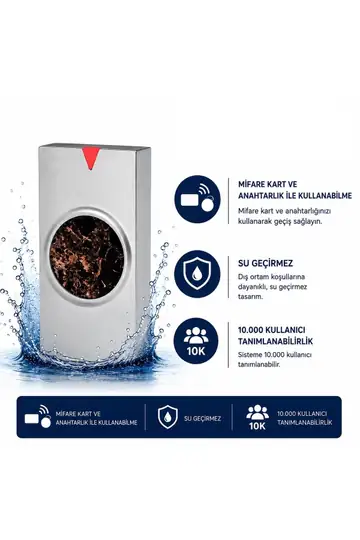 SR-209 MF-WMifare Card Reader 13.56 MHz IP68 Metal Housing 10,000 User Capacity Access Control System$ 39.59/ 1 pc
$ 31.59 each in a 10-pack
Why Geçiş Kontrol AVM?
Geçiş Kontrol AVM is an access control hardware supplier backed by 23 years of commercial experience in the low-voltage systems industry; its products are offered under its own brand, SARKEY, and it serves everything from single-unit purchases to wholesale orders of thousands of units from the same catalog.
Plan your readers, locks, buttons and tags in a single order to take advantage of free shipping.
The 2-year warranty for the SR-620, SR-621, SR-622 and SR-623 is stated on their product pages.
Technical documentation pages are published for the SR-200, SR-204, SR-205, SR-206, SR-207, SR-300, SR-720, SR-722 and SR-723: user manuals.
For installation and troubleshooting, you can contact us through the technical service page.
If you're not sure, write to us through the "Ask a Question" field on the product page or on WhatsApp (0539 821 66 12); let's determine the right frequency and model together. Phone: 0352 513 23 55.
When you pay by bank transfer/EFT, the price is lower than a single credit card payment; bank installment and shopping loan options are available. If you prefer, you can also order from our Hepsiburada store.
Frequently Asked Questions
What is the main difference between Proximity and Mifare?
Proximity operates at 125 kHz and typically broadcasts a fixed ID number; there is no memory inside the card. Mifare operates at 13.56 MHz under the ISO 14443A standard; the card contains 1 KB of memory and a password-protected sector structure. Mifare is more secure and supports multiple applications; proximity is more economical and easier to back up with duplicate cards.
Will my existing card work with the reader I just bought?
Only if the frequencies match. If you have a 125 kHz tag, buy the EM version of the reader; if you have a 13.56 MHz tag, buy the MF version. If the frequency doesn't match, the reader won't detect the card at all. Cards are re-enrolled on the new device using the master PIN.
How can I tell whether my tag is 125 kHz or 13.56 MHz?
If it says "125 kHz", "EM", "EM4100" or "TK4100" on it, it's proximity; if it says "13.56 MHz", "MF", "Mifare" or "ISO 14443A", it's Mifare. With SARKEY there's one more clue: proximity tags have an ID number printed on the front, while Mifare tags don't.
Can I duplicate my card or key fob?
On the 125 kHz side, yes: with the SR-630 copier you can write your existing tag onto a blank SR-602, SR-602 H or SR-622. On the 13.56 MHz side, the blank tag is the SR-603 or SR-623, and writing requires an SR-631/SR-633 class device. Only duplicate tags for systems you are authorized to use.
Does the SR-630 copier copy Mifare cards?
No. The SR-630 only copies 125 kHz proximity tags: it copies the SR-620 card and the SR-600 and SR-600 H key fobs onto the SR-622 card and SR-602 / SR-602 H key fobs. Duplicating Mifare (13.56 MHz) requires an SR-631 or SR-633 class device.
Can the same reader read both proximity and Mifare cards?
Standard models read a single frequency. To use both card types together, you need a dual frequency device: the SARKEY SR-212 TF (indoor) and SR-212 TF-W (outdoor, IP68) read both 125 kHz and 13.56 MHz tags and also offer a capacity of 300 fingerprints. For the current price, check the product page.
Does a card reader open the door on its own?
No. The reader only triggers a dry contact relay; the component that actually opens the door is the lock. For a complete installation, plan the reader, lock (magnetic or electric strike), door release button, power supply and tags together.
How much card capacity should my model have?
Go by the number of tags, not the number of users, and choose at least twice that capacity. The SARKEY range has 1,000 (SR-204), 2,000 (SR-200, SR-205, SR-208, SR-210, SR-221) and 10,000 (SR-207, SR-209, SR-211, SR-212, SR-215) capacity tiers. The SR-215 EM stands out on price-to-capacity balance, offering 10,000 capacity in the entry-level price band.
Which reader should I choose for an exterior door?
Outdoors you need IP68 waterproof, anti-vandal models; at SARKEY these models are identified by the "-W" suffix (such as SR-206 EM-W, SR-209 EM-W/MF-W, SR-210 EM-W, SR-212 EM-W/MF-W/TF-W). If you have to use an existing indoor device outdoors, the SR-250 rain cover provides extra protection.
What is Wiegand, and how do I connect the reader to a panel?
Wiegand is an industry-standard interface that lets the reader pass the ID it reads to an access control panel; its common formats are WG26 and WG34. SARKEY SR series models feature "Standalone, Wiegand output"; you can use them standalone today and connect them to a panel later. The SR-270 EM-W also supports WG26 input.
Should I buy cards or key fobs?
If a logo, name or apartment number will be printed on it, a card (SR-620 / SR-621) is the better fit; if it will be carried in a pocket or on a key ring, a key fob (SR-600 / SR-601) is. Key fobs have ABS housings, resist crushing and are IP68-rated on select models; they also come in 8 colors, which lets you color-code groups.
Is shipping free, and how can I pay?
Shipping is free on orders of 2,000 TL and above. You can pay by credit card (single payment or bank installments), bank transfer/EFT or shopping loan; when you pay by bank transfer/EFT, the price is lower than a single credit card payment. If you prefer, you can also order from the Hepsiburada store.
Conclusion: The Decision Comes Down to Three Questions
The answer to proximity vs. Mifare lies not in the technology itself but in how your building operates. Once you answer three questions, the decision becomes clear on its own. One: Who will produce backup cards, and where? If management will make them in-house, go with 125 kHz proximity; if you want controlled supply from outside, 13.56 MHz Mifare. Two: Will the card only open doors, or will it also be used for other things such as the cafeteria and stored balance? In the second case, Mifare is a must. Three: How many tags will be issued? As the quantity grows, the cost of the frequency difference comes from the cards, not the reader.
Practical summary: for most apartment building, residential complex, shop and warehouse installations, the SR-204 EM or SR-205 EM is sufficient and economical; at exterior doors, the SR-206 EM-W / SR-209 EM-W provides IP68 protection. For corporate buildings such as offices, factories, hotels and schools, the SR-208 MF, SR-209 MF-W or SR-211/212 MF series is the right choice. And during transition periods when you need to run both card types side by side, the SR-212 TF-W solves the problem on its own. Don't forget to plan the lock, button and power supply items in the same cart; for current prices, check the product pages.
If you're still torn on any point, don't guess: send a photo of your tag and your door details via WhatsApp, and let's determine the right model together. Choosing the wrong frequency costs far more than a phone call.
Proximity and Mifare card readers, RFID cards and key fobs, magnetic locks, buttons and copiers — backed by SARKEY, with free shipping on orders over 2,000 TL.
Browse Access Control Systems →Pre-order consultation: WhatsApp 0539 821 66 12 · Phone 0352 513 23 55